There is no single right length, but there is a sensible way to choose one. Common practice, staggering tiers, and what to set for everyone else.
Merchants who run early access ask the same question sooner or later: how long should the head start be? Too short and VIPs feel they got nothing. Too long and everyone else gets bored, or the product is gone before the public ever sees it.
There is no number that fits every store. There is a sensible way to choose one, and it starts with what the head start is for.
What common practice says
In merchant discussions, including threads in the Shopify community, short windows are the ones you see most often. Twelve to twenty-four hours is a typical suggestion for a drop. That is a rule of thumb that merchants share, not a measured result, and your own audience may differ.
The reasoning behind a short window is easy to follow. A head start is a reward. A few hours is enough to feel like a privilege, and it keeps the product in front of your wider audience while it is still new.
Questions that move the number
- How big is the run? A small run can sell to VIPs alone, so a long window is pointless for the public.
- How big is your VIP group? A small group of devoted customers does not need much time. A large one may need a day to get through checkout.
- How fast do customers react? If your emails are read within minutes, a few hours will do. If they trickle in over days, give it longer.
- Where do your customers live? Launch times are set in your store's time zone, and shoppers elsewhere get access at the same moment shown in their own time. Choose an hour that is reasonable for the people you want to reach.
- Is there a limit per customer? A limit of one or two per person lets a longer window work without one person taking the whole run.
Stagger your tiers
If you have more than one tier, you do not have to open them all at once. A staggered schedule makes the top tier feel special and keeps the later tiers in play.
A simple pattern looks like this:
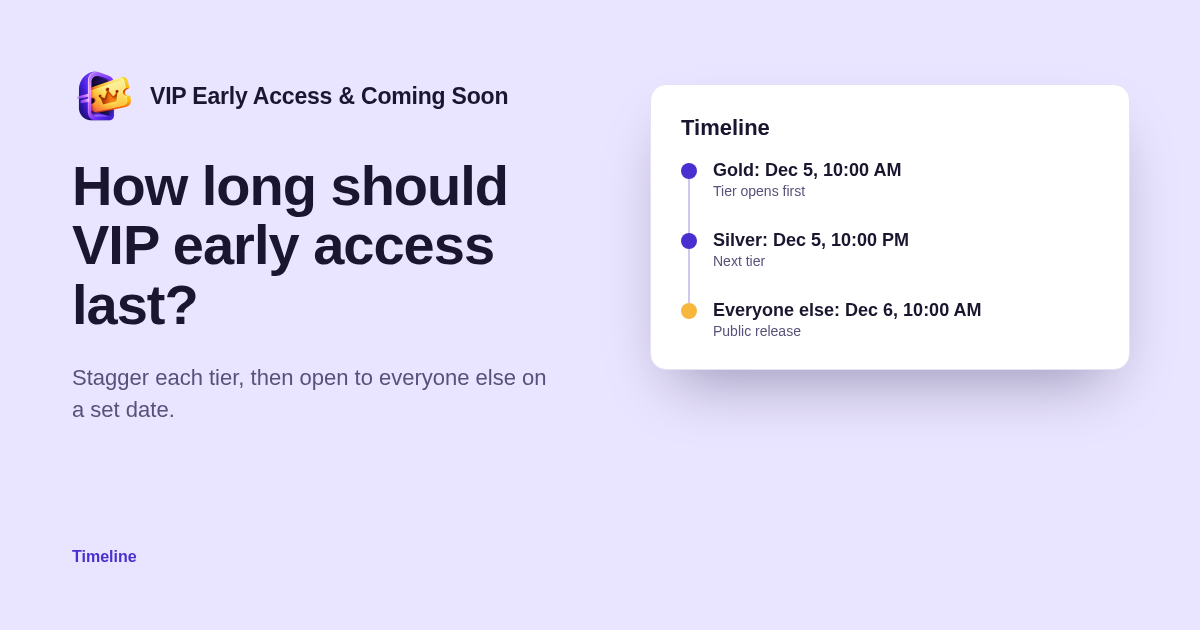
- Gold opens first, for example at 10:00 on launch day.
- Silver opens later the same day, for example at 22:00.
- Everyone else opens the next day at 10:00.
That gives your top tier twelve hours with the product to itself and the next tier a further twelve before the public. The numbers are an example. Change the gaps until the schedule fits your audience.
A higher tier cannot be set to open later than a tier below it, so the order you set in your tier ladder is also the order of the schedule.
Keep the steps meaningful
If two tiers open an hour apart, customers will not feel the difference. Make each step long enough that the earlier tier gets a real head start.
The public date, and the other option
Everyone else needs a date too. Decide it with the same care as the VIP date. A public date that is set but vague in your emails leads to questions, so state it in the announcement.
You do not have to open to the public at all. A VIP-only launch has no date for everyone else. It runs until you end it, or until an end time you set. That suits members-only products, limited editions for your best customers, and tests. If you later decide to sell widely, create a new launch with a public date.
Setting the timeline in VIP Early Access
The launch editor has a section called Who can buy, and when. For each tier you choose Right away or On a date, and set the time. Everyone else has its own row and its own switch. The launch page shows a Timeline with each tier's date, then the date for everyone else, and the end time if you set one.
- Times are entered in your store's time zone, or the one you choose in the app's settings.
- A launch with a raffle has its own timing: entries open and close, and winners can buy from a time you set, at least 15 minutes after entries close.
- A launch can be moved back to draft only while no tier can buy yet, so settle the times before you schedule.
- The app warns you before you schedule if, for example, a date has already passed or no tier can buy before everyone else.
After the launch, open its performance report. It shows orders, revenue and buyers, and the orders placed before everyone else could buy. Compare it with the next launch before you change the length of the window. The product drop checklist has the rest of the steps, and the pricing page shows what each plan includes.
Frequently asked questions
Is there an ideal length for VIP early access?
No. Short windows such as 12 to 24 hours are commonly suggested by merchants, but the right length depends on the size of your run, the size of your VIP group and how fast your customers react.
Can I give each tier a different opening time?
Yes. Each tier has its own date and time. A higher tier cannot open later than a tier below it.
Can a launch be VIP-only?
Yes. Leave Everyone else switched off and the launch has no public date. It keeps running until you end it or until the end time you set.
Which time zone are launch times in?
Your store's time zone from Shopify settings, unless you choose another one in the app's settings. Shoppers in other countries get access at the same moment, shown in their own time.
Schedule staggered VIP opening windows, countdowns, and checkout protection on Shopify — every feature is included on the Free plan.
Install VIP Early Access on Shopify