When stock is tight, hiding the Add to Cart button does not stop one buyer from checking out twice. Here is how to enforce a 1-per-customer limit across carts and repeat orders in Shopify.
Whether you sell limited sneakers, Pokémon booster boxes, allocated whiskey, or small-batch merch, a "Limit 1 per customer" banner in the product description is easy to ignore. Without real enforcement, one shopper can either bump the quantity in the cart drawer or place three separate one-unit orders before your team spots them.
Setting up a proper per-customer limit means enforcing it inside Shopify checkout and across orders, not just on the product page.
Why theme-level quantity limits fail
Many stores start by editing quantity inputs in Liquid (max="1") or adding a cart drawer script. That catches honest mistakes, but fails in three common ways:
- Multiple orders bypass cart limits: a shopper buys 1 unit, checks out, and immediately places a second order for 1 more unit.
- Multiple products in one drop: if a launch includes several colorways or variants/products and you want 1 total item per person across the drop, a single product input won't count across products.
- Cart links and express checkouts: direct
/cart/addlinks or Shop Pay bypass theme JavaScript checks.
How real per-customer limits work in Shopify
To hold under pressure, a limit needs two parts working together:
- In-cart validation: sums all units belonging to the launch across every line in the cart, so adding two different products from the same launch still triggers the limit.
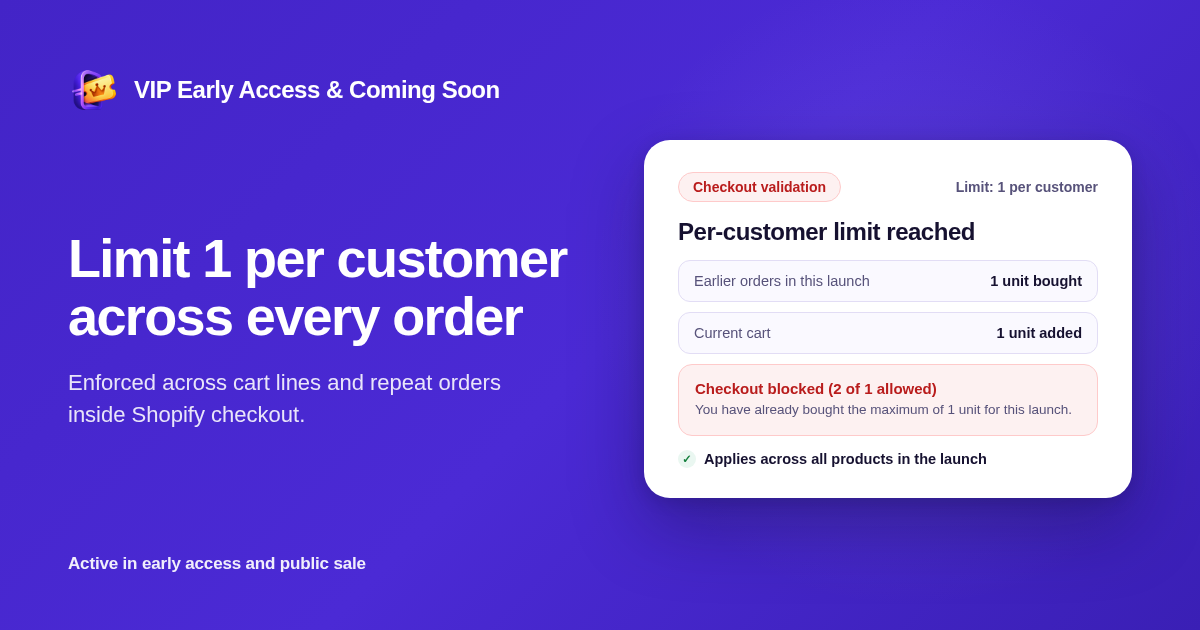
- Cross-order tracking: counts units the customer already bought in earlier orders during the same launch, so placing a second order is blocked at checkout too.
In VIP Early Access, you enable Limit how many each customer can buy directly inside your launch settings and enter any whole number from 1 to 999.
- The product page panel displays the limit clearly (for example,
Limit: 1 per customer) while the product is gated. - The checkout rule checks the sum of (units already bought in the launch + units in the current cart) against your limit.
- The limit stays active during both early access and the public release until the launch ends.
- If a customer's earlier order is cancelled, those units are automatically subtracted so they can buy again.
What to expect at the edges (be transparent with shoppers)
Every limit system on Shopify has practical boundaries worth stating clearly in your drop FAQ:
- Signed-in customers: cross-order limits track signed-in customer accounts. During VIP early access or raffle windows, customers must be signed in anyway to pass the gate.
- Guests in a public sale: if your launch opens to the general public and a guest checks out without signing in, Shopify cannot match them to earlier guest orders — so guests are limited per cart rather than across orders.
- Separate accounts: a shopper creating a second account with a different email counts as a separate customer in Shopify.
- Plan eligibility: Shopify Cart and Checkout Validation works on every Shopify plan except Starter, and does not cover Point of Sale.
Setting it up in under two minutes
- Open Launches in VIP Early Access and create or edit a launch.
- Select the products or collection in the launch.
- Under Limit per customer, check the box and enter
1(or your chosen cap). - Set your VIP tier times, raffle (optional), or public release date, and schedule the launch.
The limit applies automatically across all products in that launch — available on every plan, including Free. See the pricing page for plan details, or read Why unlisted collections fail for drops.
Frequently asked questions
Does the limit apply across multiple products in the same launch?
Yes. The limit counts total units across every product included in the same launch, not just per individual product or cart line.
Does it stop someone from placing two separate orders?
Yes, for signed-in customers. As soon as an order is placed, those units are counted for that launch so a customer cannot check out a second time above the limit. If an order is cancelled, the count updates automatically.
What happens if a guest tries to buy more than the limit?
During the public release, guests who do not sign in are still limited per cart (for example, they cannot buy 2 in one checkout), though earlier guest orders are not tracked unless they sign in. During early access or raffle windows, guests cannot buy at all.
Does the limit stay active after early access opens to everyone?
Yes. Once enabled on a launch, the per-customer limit stays active throughout early access and the public sale until the launch ends.
Enforce 1-per-customer limits across carts and repeat orders directly at Shopify checkout — free to start.
Install VIP Early Access on Shopify